- BRD vs FRD vs HLD vs LLD
|
Aspect |
BRD (Business Requirement Document) |
FRD (Functional Requirement Document) |
HLD (High Level Design) |
LLD (Low Level Design) |
|
Purpose |
Defines business goals |
Defines system functionality |
Defines overall system architecture |
Defines detailed implementation |
|
Focus |
What business wants |
What system should do |
How system is structured |
How each component works |
|
Audience |
Business stakeholders, clients |
BA, Dev, QA |
Architects, Tech Leads |
Developers |
|
Created By |
Business Analyst |
Business Analyst / Functional Analyst |
Architect |
Developers / Tech Leads |
|
Level |
Very high-level |
Mid-level |
High-level technical |
Very detailed |
|
Content |
Business objectives, scope, stakeholders |
Functional features, workflows, use cases |
Architecture diagrams, tech stack |
Class diagrams, APIs, DB schema |
|
Example |
“User should be able to order food” |
“User can add item to cart and checkout” |
Microservices: Order, Payment, Inventory |
OrderService.java methods, DTOs |
|
Includes UI? |
No |
Yes (sometimes) |
No |
No |
|
Includes Code? |
No |
No |
No |
Yes (pseudo/code-level) |
|
Output Type |
Document |
Document |
Diagrams + Docs |
Detailed design + code |
|
Used In Phase |
Requirement gathering |
Requirement analysis |
Design phase |
Development phase |
|
Change Frequency |
Low |
Medium |
Medium |
High |
Simple Understanding (One
Line)
- BRD → Business idea
- FRD → Functional behavior
- HLD → System blueprint
- LLD → Code-level design
- Java Architect Interview Questions
|
Category |
Question |
What Interviewer Checks |
|
Core Java |
Explain JVM architecture |
Deep Java fundamentals |
|
Spring |
How does Spring Boot auto-configuration work? |
Framework mastery |
|
Microservices |
How do you handle distributed transactions? |
Real-world design |
|
Design Patterns |
Explain Factory vs Singleton |
Design thinking |
|
System Design |
Design URL shortener |
Scalability thinking |
|
Performance |
How to improve API response time? |
Optimization skills |
|
Security |
How does OAuth2 work? |
Security knowledge |
|
Cloud |
How to design cloud-native apps? |
Modern architecture |
|
DB |
SQL vs NoSQL—when to use? |
Data decisions |
|
Messaging |
Kafka vs RabbitMQ |
Event-driven systems |
|
DevOps |
CI/CD pipeline steps |
Delivery process |
|
Troubleshooting |
Production issue debugging steps |
Problem-solving |
- Real-Time System Design Examples
Example 1: E-Commerce System
|
Component |
Description |
|
User Service |
Handles login, profile |
|
Product Service |
Product catalog |
|
Cart Service |
Shopping cart |
|
Order Service |
Order processing |
|
Payment Service |
Payment integration |
|
Inventory Service |
Stock management |
|
Notification Service |
Email/SMS |
Flow:
- User → Add to cart
- Cart → Order Service
- Order → Payment
- Payment success → Inventory update
- Notification sent
Example 2: URL Shortener
(like Bitly)
|
Component |
Design |
|
API Layer |
Create short URL |
|
DB |
Store mapping |
|
Cache |
Redis for fast lookup |
|
Key Generation |
Base62 encoding |
|
Scaling |
Load balancer |
Example 3: Ride Booking
System
|
Component |
Function |
|
Rider Service |
Book ride |
|
Driver Service |
Availability |
|
Matching Engine |
Assign driver |
|
Pricing Service |
Fare calculation |
|
Tracking Service |
Real-time location |
- Roadmap to Become Java Architect
Step-by-Step Growth Plan
|
Stage |
Skills to Learn |
Experience |
|
Junior Dev |
Core Java, OOP |
0–2 yrs |
|
Mid Dev |
Spring Boot, REST APIs |
2–5 yrs |
|
Senior Dev |
Microservices, DB design |
5–8 yrs |
|
Tech Lead |
System design, mentoring |
8–10 yrs |
|
Architect |
Cloud, distributed systems |
10+ yrs |
- Must Learn Technologies
|
Category |
Tools |
|
Backend |
Java, Spring Boot |
|
Microservices |
Spring Cloud |
|
Messaging |
Kafka, RabbitMQ |
|
DB |
MySQL, MongoDB |
|
Cache |
Redis |
|
Cloud |
AWS |
|
DevOps |
Docker, Kubernetes |
|
Monitoring |
Prometheus, Grafana |
- Sample HLD vs LLD (Practical Example)
6.1 HLD (High-Level Design)
|
Element |
Description |
|
Architecture |
Microservices |
|
Services |
User, Order, Payment |
|
Communication |
REST + Kafka |
|
DB |
Separate DB per service |
|
Deployment |
Docker + Kubernetes |
|
Security |
JWT |
Diagram (concept):
User → API Gateway → Services → DB
6.2 LLD (Low-Level Design)
|
Component |
Details |
|
Class |
OrderService |
|
Methods |
createOrder(), cancelOrder() |
|
DTOs |
OrderRequest, OrderResponse |
|
DB Tables |
orders, order_items |
|
API |
POST /orders |
|
Validation |
Bean validation |
|
Exception Handling |
Global exception handler |
- Architect Daily Activities
|
Time |
Activity |
|
Morning |
Check logs, production issues |
|
Standup |
Team sync |
|
Mid-day |
Design discussions |
|
Afternoon |
Code reviews |
|
Evening |
Documentation, planning |
- Key Design Patterns
|
Pattern |
Use Case |
|
Singleton |
Single instance |
|
Factory |
Object creation |
|
Builder |
Complex object |
|
Strategy |
Dynamic behavior |
|
Observer |
Event systems |
- Important Architect Decisions
|
Area |
Decision Example |
|
DB |
SQL vs NoSQL |
|
API |
REST vs GraphQL |
|
Communication |
Sync vs Async |
|
Deployment |
Monolith vs Microservices |
|
Scaling |
Vertical vs Horizontal |
- Real Architect Mindset
|
Area |
Reality |
|
Coding |
Less coding, more design |
|
Responsibility |
Very high |
|
Impact |
Affects entire system |
|
Skills |
Technical + Communication |
- Final Summary (One View)
|
Document |
Purpose |
|
BRD |
Business vision |
|
FRD |
Functional behavior |
|
HLD |
System architecture |
|
LLD |
Code-level design |
- Java Architect Interview
12.1
Q1: Explain JVM Architecture
The Java Virtual Machine (JVM) is responsible for executing Java bytecode and provides platform independence.
Key Components:
|
Component |
Description |
|
Class Loader |
Loads .class files |
|
Method Area |
Stores class metadata |
|
Heap |
Stores objects (GC managed) |
|
Stack |
Stores method calls, local variables |
|
PC Register |
Tracks execution |
|
Native Method Stack |
Handles native calls |
Architect Insight:
Ø Tune JVM for performance (Heap size, GC tuning)
Ø Avoid memory leaks
Ø Monitor using tools like JVisualVM
12.2
Q2: How does Spring Boot
Auto-Configuration work?
Spring Boot uses:
Ø @EnableAutoConfiguration
Ø spring.factories (now AutoConfiguration.imports)
Ø Conditional annotations (@ConditionalOnClass, etc.)
👉 Flow:
- Spring scans dependencies
- Applies configurations automatically
- Overrides possible via properties
👉 Architect Insight:
Ø Reduces boilerplate
Ø Important for microservices standardization
12.3
Q3: How do you handle Distributed
Transactions?
Use Saga Pattern instead of traditional transactions.
Types:
|
Type |
Description |
|
Choreography |
Services communicate via events |
|
Orchestration |
Central coordinator |
👉 Tools:
Ø Kafka
Ø Event-driven architecture
👉 Example:
Order → Payment → Inventory → If failure → rollback
events
12.4
Q4: How do you design scalable
systems?
|
Technique |
Explanation |
|
Horizontal Scaling |
Add more instances |
|
Load Balancer |
Distribute traffic |
|
Caching |
Redis |
|
DB Sharding |
Split database |
|
CDN |
Static content |
Architect Thinking:
- Design for failure
- Stateless services
12.5
Q5: REST vs GraphQL
|
Feature |
REST |
GraphQL |
|
Data Fetching |
Fixed |
Flexible |
|
Over-fetching |
Yes |
No |
|
Complexity |
Simple |
Complex |
Architect Decision:
- REST for simple systems
- GraphQL for complex UI needs
12.6
Q6: Kafka vs RabbitMQ
|
Feature |
Kafka |
RabbitMQ |
|
Model |
Distributed log |
Message queue |
|
Use Case |
Event streaming |
Task queue |
|
Performance |
High |
Medium |
Architect Decision:
- Kafka for high-scale systems
12.7
Q7: How do you improve API
performance?
Ø Caching (Redis)
Ø DB indexing
Ø Async processing
Ø Pagination
Ø Connection pooling
12.8
Q8: Explain Circuit Breaker Pattern
Prevents cascading failures.
👉 States:
Ø Closed
Ø Open
Ø Half-open
👉 Tool:
Ø Resilience4j
- End-to-End System Design (E-Commerce
Example)
13.1
Architecture Overview
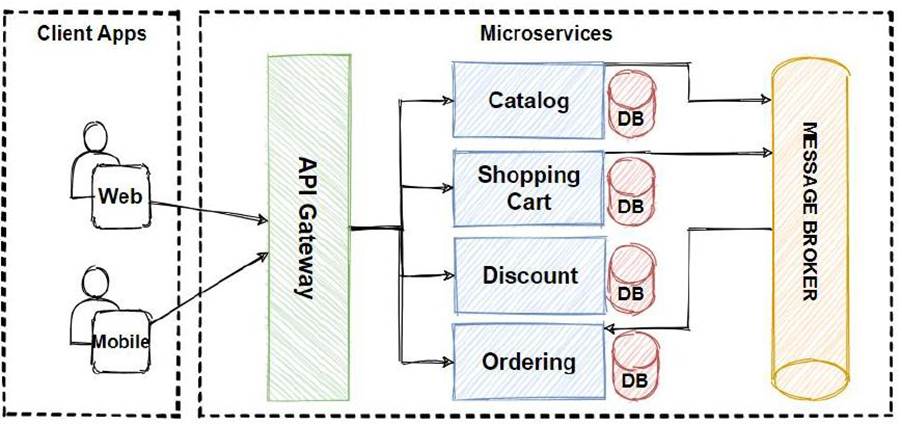
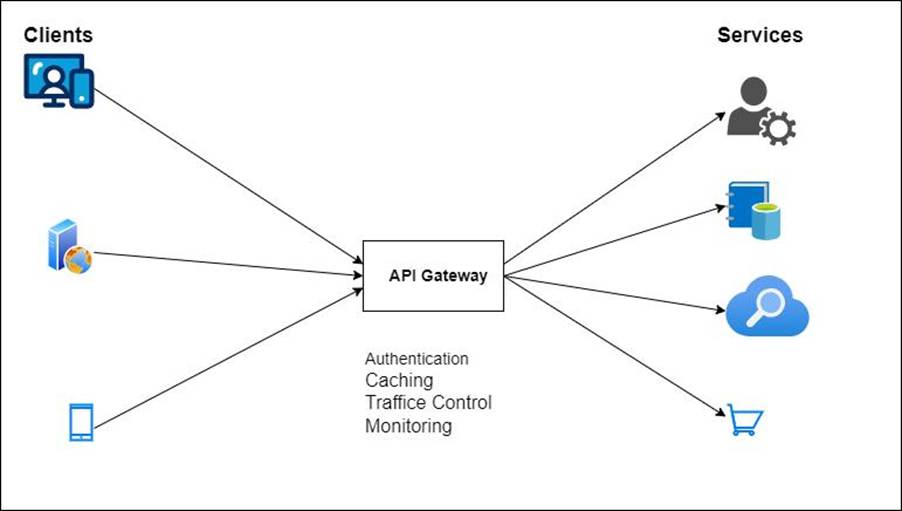
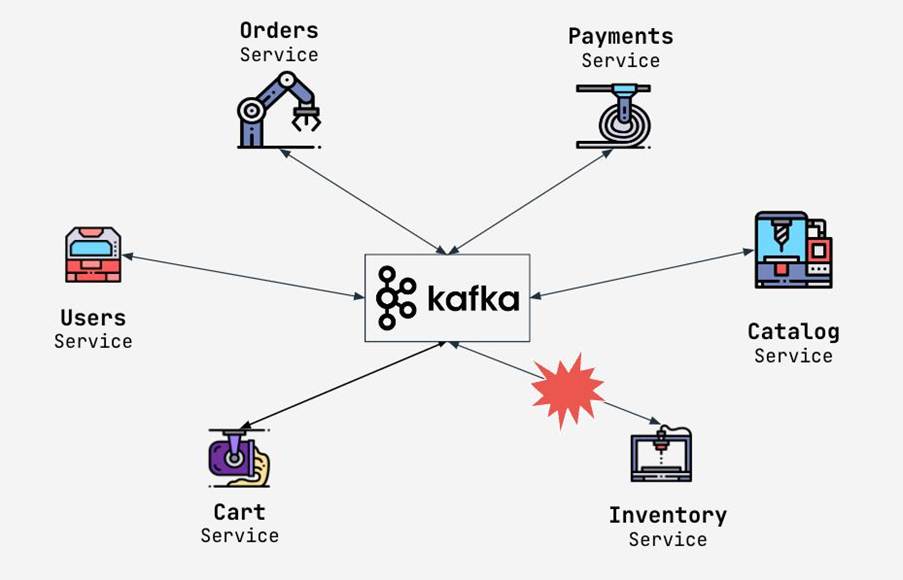
13.2
Components
|
Layer |
Component |
|
Client |
Web / Mobile |
|
Gateway |
API Gateway |
|
Services |
User, Order, Payment |
|
Messaging |
Kafka |
|
DB |
MySQL, MongoDB |
|
Cache |
Redis |
|
Cloud |
AWS |
Flow
- User → API Gateway
- Gateway → Order Service
- Order → Kafka Event
- Payment Service consumes
- Inventory updates
- Notification sent
- Key Design Decisions
|
Area |
Decision |
|
Architecture |
Microservices |
|
Communication |
REST + Kafka |
|
Security |
JWT |
|
Scaling |
Kubernetes |
|
Storage |
Polyglot persistence |
14.1
Hands-On Project (Spring Boot +
Microservices + Kafka + AWS)
Project: Online Order System
14.2
Microservices
|
Service |
Responsibility |
|
User Service |
Authentication |
|
Order Service |
Order processing |
|
Payment Service |
Payment |
|
Inventory Service |
Stock |
|
Notification Service |
Email/SMS |
14.3
Tech Stack
|
Layer |
Tech |
|
Backend |
Spring Boot |
|
Messaging |
Apache Kafka |
|
DB |
MySQL |
|
Cache |
Redis |
|
Cloud |
AWS (EC2, S3, RDS) |
|
DevOps |
Docker, Kubernetes |
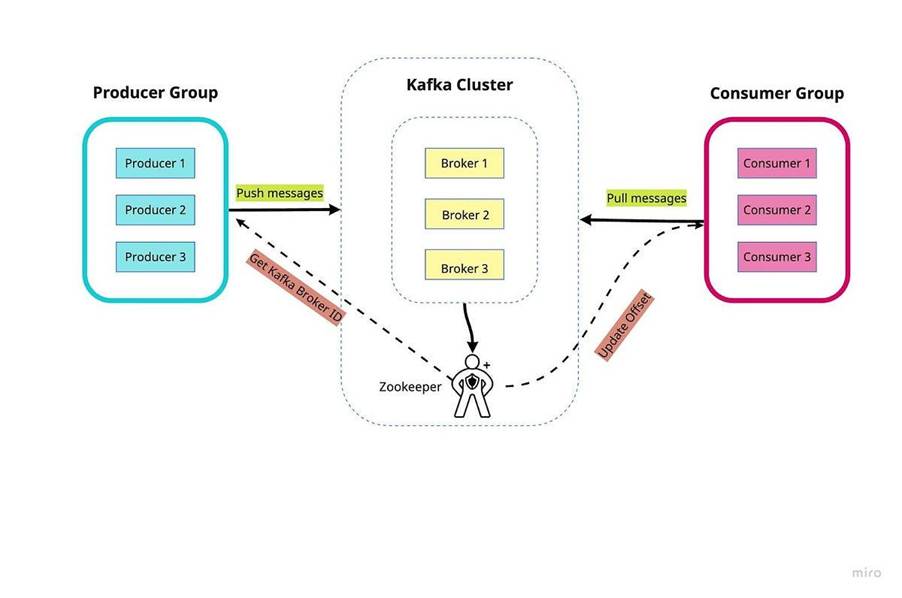
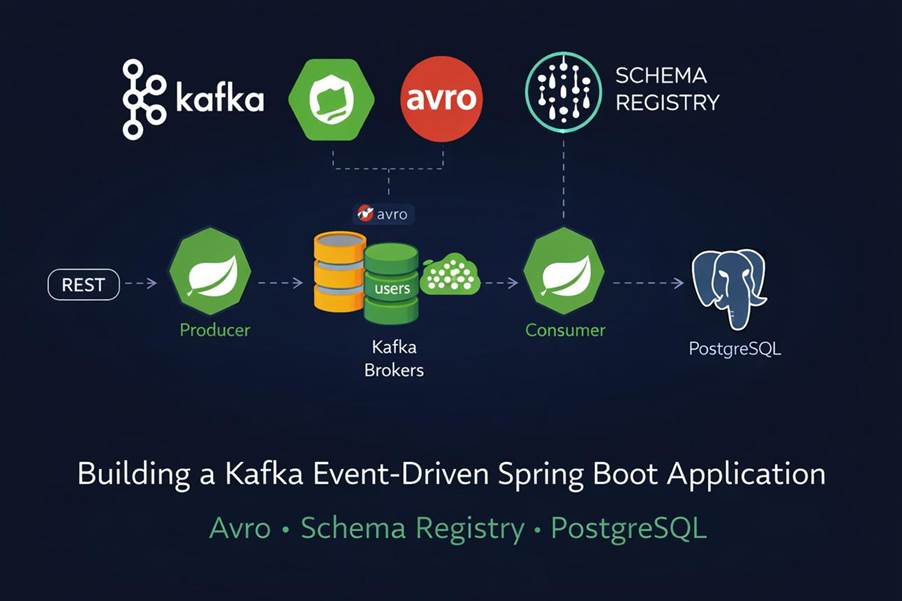
14.4
Kafka Flow
Kafka Flow
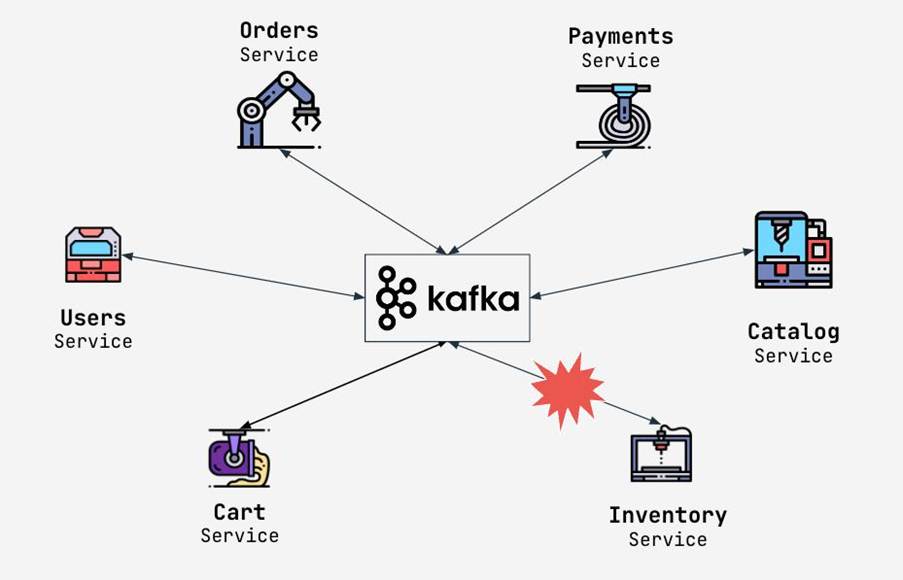
14.5
Steps to Build
Step 1: Create Microservices
Ø Spring Initializr
Ø Add dependencies (Web, JPA, Kafka)
Step 2: API Design
Ø POST /orders
Ø GET /orders/{id}
Step 3: Kafka Integration
Ø Producer → Order Service
Ø Consumer → Payment Service
Step 4: Database
Ø Separate DB per service
Step 5: Dockerize
Ø docker build -t order-service .
Step 6: Deploy on AWS
Ø EC2 → services
Ø RDS → DB
Ø S3 → storage
🔹 Sample Kafka Code
@KafkaListener(topics =
"order-topic")
public void consume(OrderEvent
event) {
// process payment
}
- Mock Interview + Real Practice
15.1
Round 1: Coding + Concepts
|
Question |
Expected Answer |
|
Difference between HashMap & ConcurrentHashMap |
Thread safety |
|
Explain Java Streams |
Functional programming |
|
Optional class |
Null handling |
15.2
Round 2: System Design
|
Question |
Focus |
|
Design Netflix |
Scalability |
|
Design Payment System |
Consistency |
|
Design Chat App |
Real-time |
15.3
Round 3: Architecture
|
Question |
What to Say |
|
Monolith vs Microservices |
Trade-offs |
|
How to handle failures |
Retry, circuit breaker |
|
Logging strategy |
ELK |
15.4
Round 4: Scenario-Based
Example:
“Payment service is slow”
Ø Check logs
Ø Analyze DB queries
Ø Add caching
Ø Scale service
- REAL HLD DOCUMENT
16.1
Project: Online Order Management
System
|
Field |
Details |
|
System Name |
Order Management System |
|
Architecture |
Microservices |
|
Users |
Customers, Admin |
|
Scale |
1M+ users |
|
Availability |
99.9% |
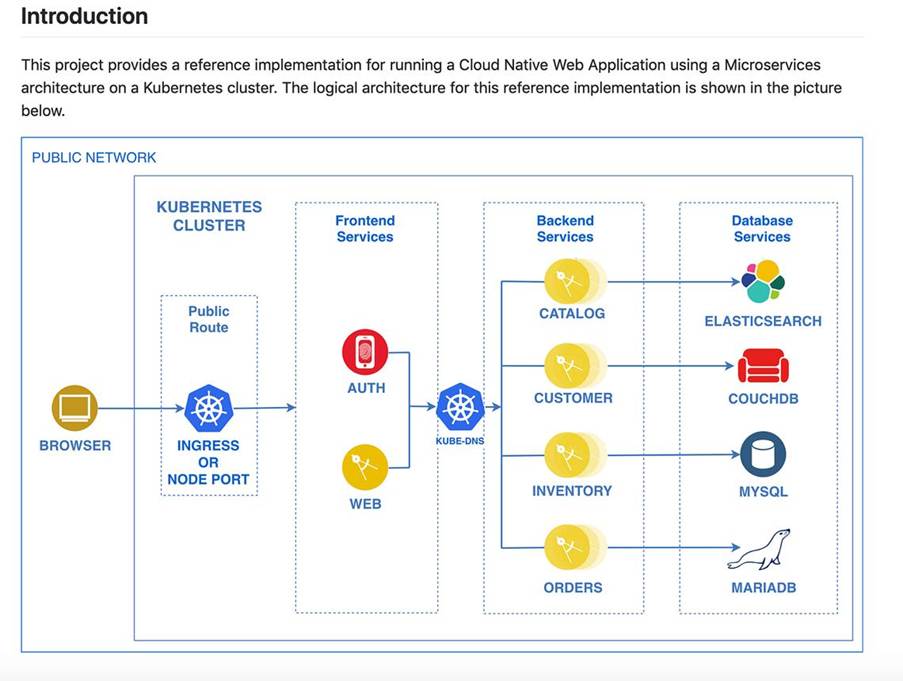
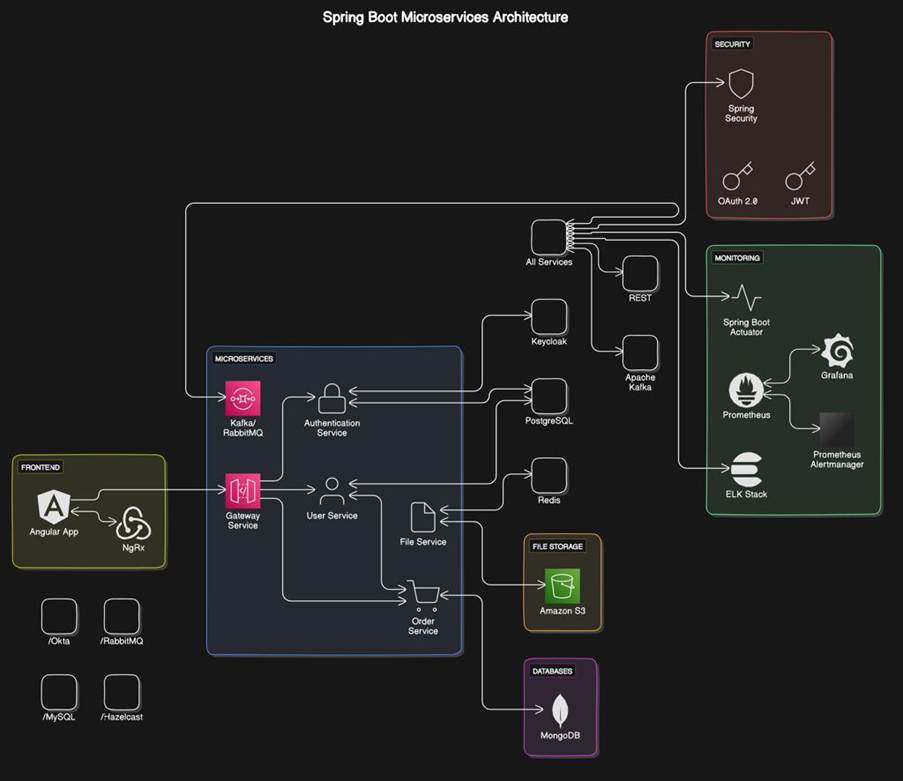
16.2
Architecture Diagram
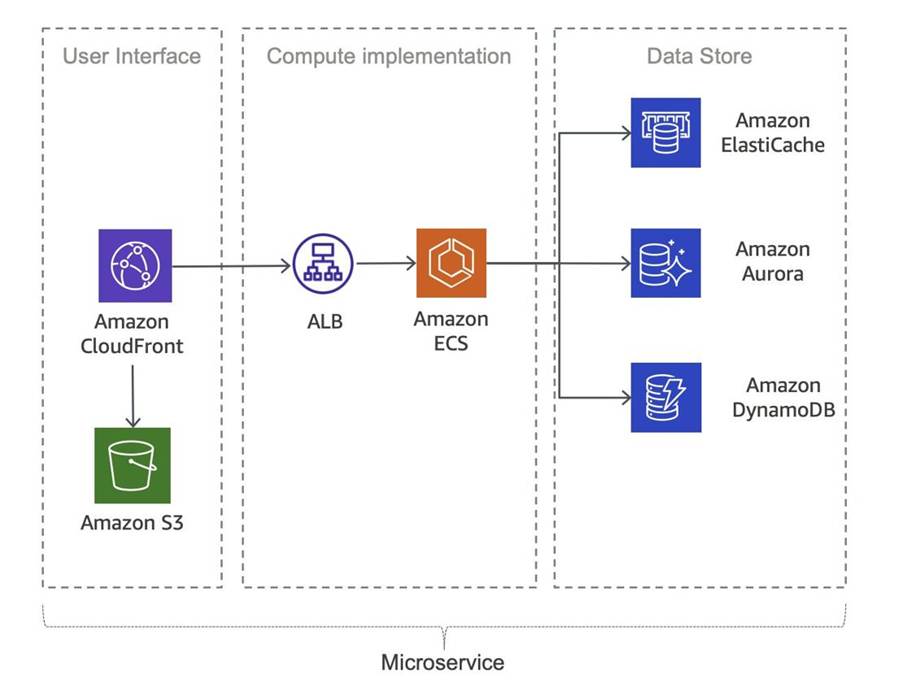
16.3
High-Level Components
|
Component |
Description |
|
API Gateway |
Entry point |
|
Auth Service |
JWT authentication |
|
Order Service |
Order processing |
|
Payment Service |
Payment handling |
|
Inventory Service |
Stock management |
|
Notification Service |
Email/SMS |
|
Kafka |
Event streaming |
|
Redis |
Caching |
|
MySQL |
Data storage |
16.4
Architecture Style
|
Pattern |
Usage |
|
Microservices |
Independent services |
|
Event-Driven |
Kafka communication |
|
API Gateway |
Routing |
|
Circuit Breaker |
Fault tolerance |
Data Flow
- User → API Gateway
- Gateway → Order Service
- Order → Kafka event
- Payment Service consumes
- Inventory updates
- Notification triggered
16.5
Non-Functional Requirements (NFR)
|
Category |
Requirement |
|
Scalability |
Horizontal scaling |
|
Performance |
<200ms response |
|
Security |
OAuth2 + JWT |
|
Reliability |
Retry + Circuit breaker |
|
Monitoring |
Prometheus + Grafana |
16.6
Deployment Architecture
|
Layer |
Tool |
|
Container |
Docker |
|
Orchestration |
Kubernetes |
|
Cloud |
AWS |
|
CI/CD |
Jenkins |
16.7
Key Decisions
|
Decision |
Reason |
|
Kafka |
High throughput |
|
Redis |
Fast caching |
|
Microservices |
Scalability |
- REAL LLD DOCUMENT
17.1
Order Service – Detailed Design
Class Diagram (Concept)
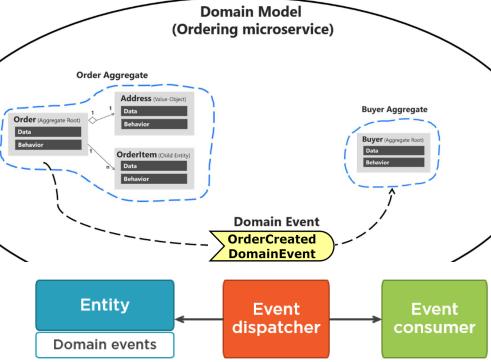
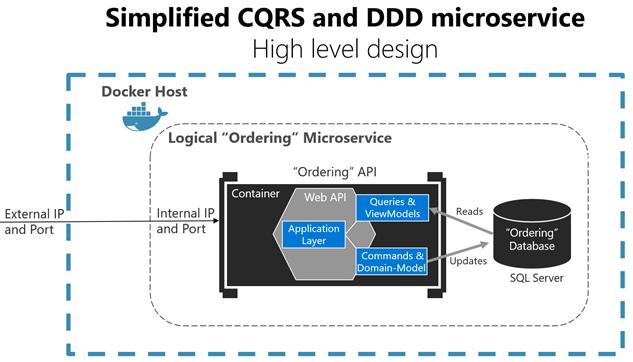
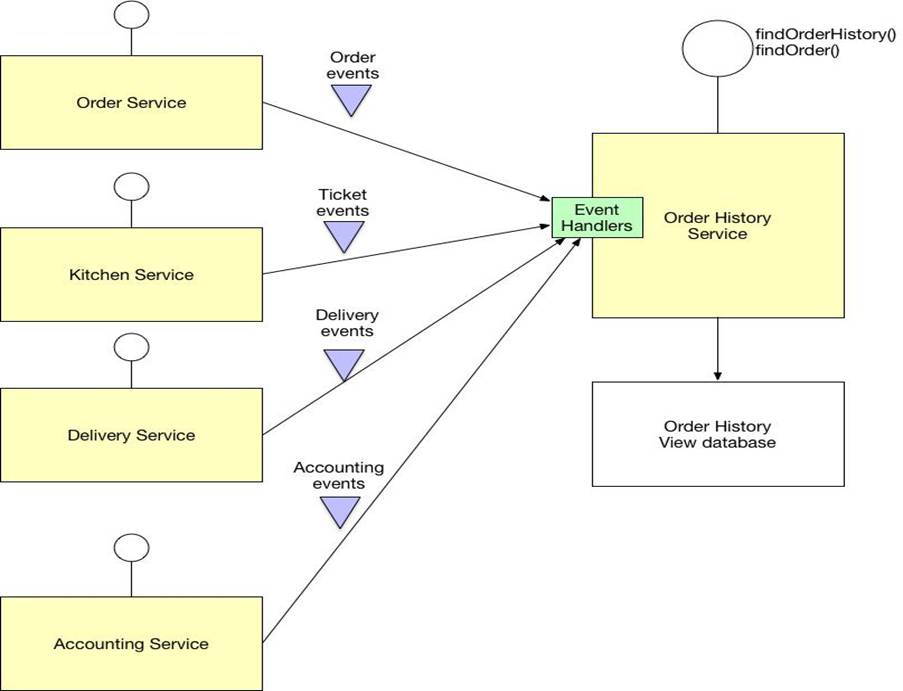
17.2
Components
|
Layer |
Class |
|
Controller |
OrderController |
|
Service |
OrderService |
|
Repository |
OrderRepository |
|
DTO |
OrderRequest, OrderResponse |
|
Entity |
Order, OrderItem |
17.3
API Design
|
API |
Method |
Description |
|
/orders |
POST |
Create order |
|
/orders/{id} |
GET |
Get order |
|
/orders/{id} |
DELETE |
Cancel order |
- Database Design
|
Table |
Fields |
|
orders |
id, user_id, status, total |
|
order_items |
id, order_id, product_id, qty |
18.1
Sequence Flow
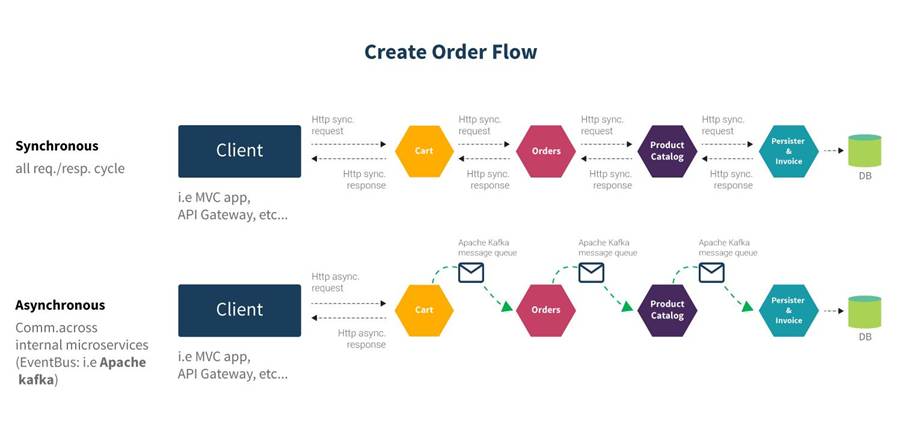
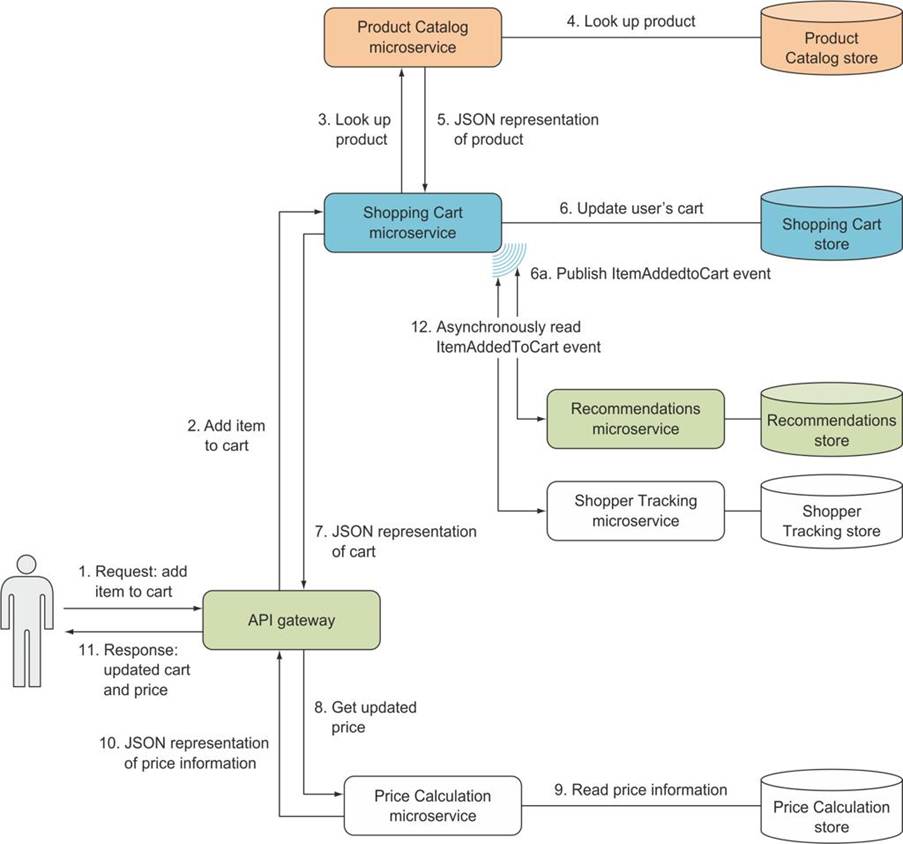
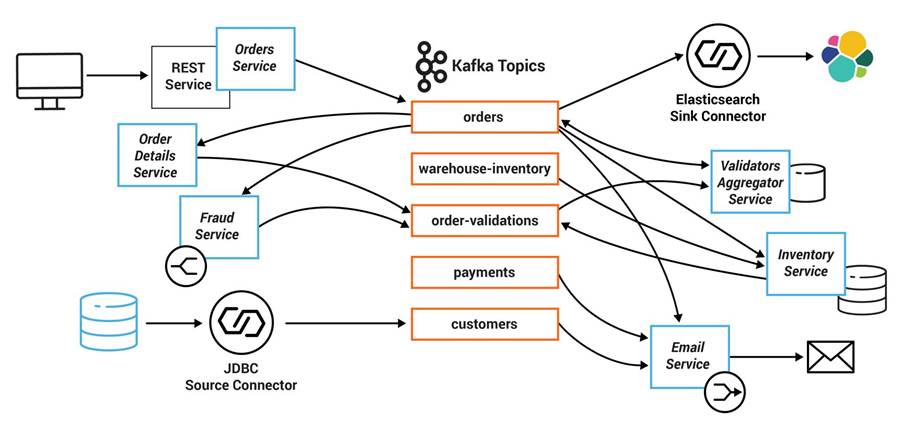
Flow:
- Controller receives request
- Service validates
- Save to DB
- Publish Kafka event
- Return response
18.2
Exception Handling
|
Scenario |
Handling |
|
Invalid input |
400 |
|
DB failure |
Retry |
|
Payment fail |
Saga rollback |
18.3
Sample Code (LLD Level)
@RestController
@RequestMapping("/orders")
public class OrderController {
@Autowired
private OrderService orderService;
@PostMapping
public ResponseEntity<OrderResponse> createOrder(@RequestBody OrderRequest request) {
return ResponseEntity.ok(orderService.createOrder(request));
}
}
@Service
public class OrderService {
public OrderResponse createOrder(OrderRequest request) {
// validate
// save order
// publish event
return new OrderResponse();
}
}
- LIVE CODING + SYSTEM DESIGN WALKTHROUGH
problem: Design URL Shortener (like Bitly)
🧠 Step 1: Requirements
Functional:
- Shorten URL
- Redirect to original URL
Non-Functional:
- High availability
- Low latency
🏗️ Step 2:
High-Level Design
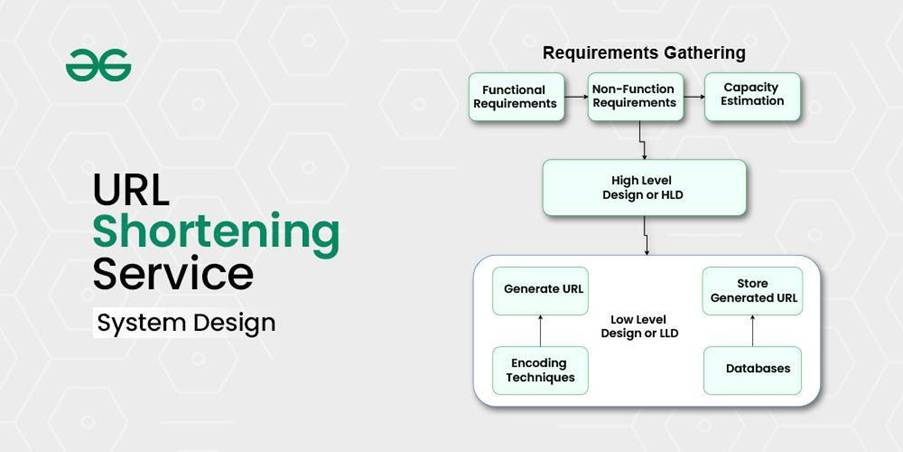
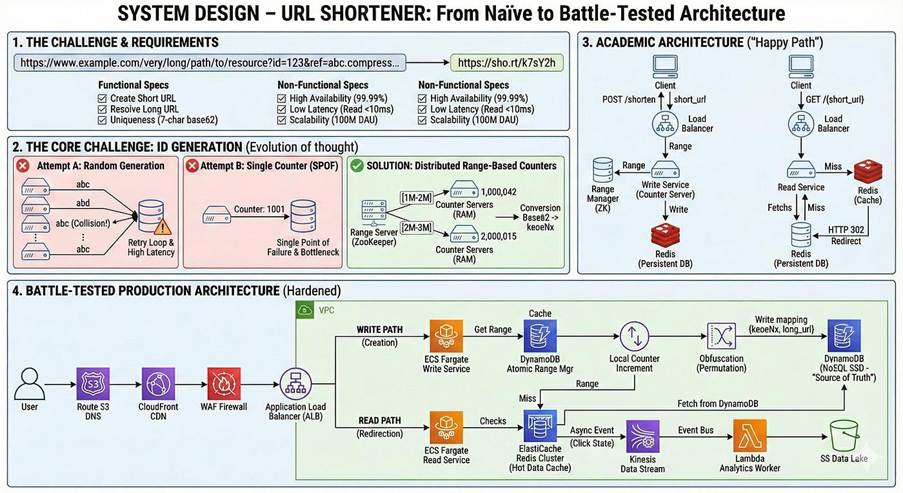
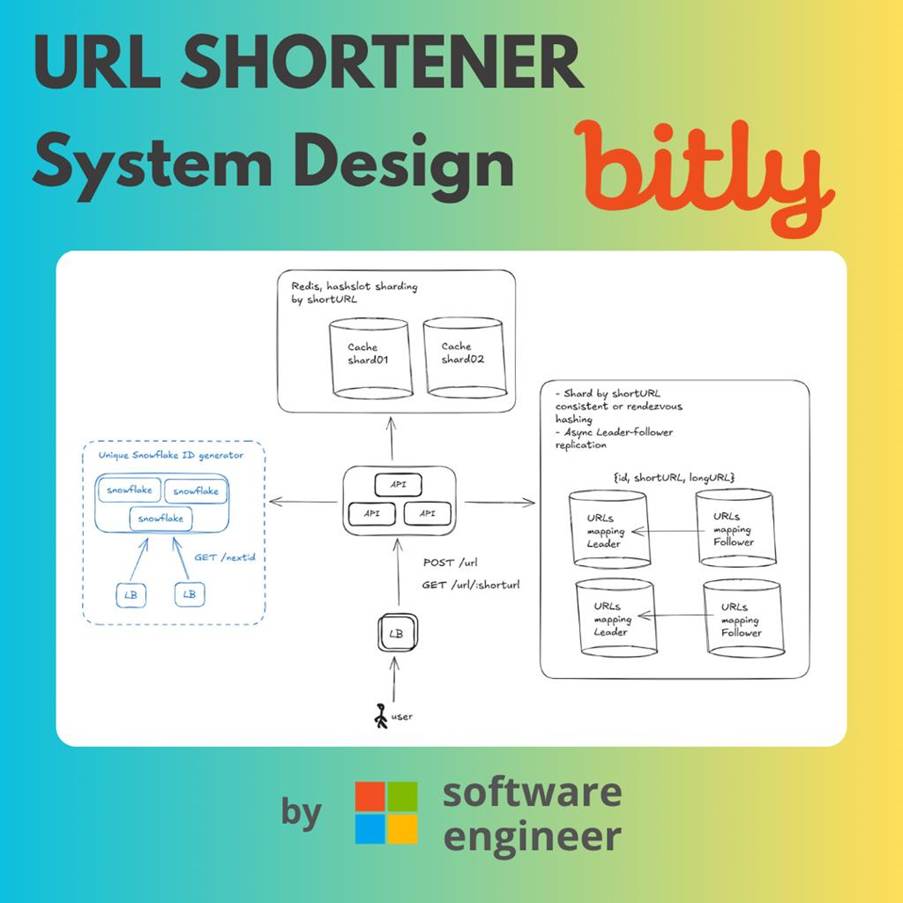
6
Components:
|
Component |
Role |
|
API |
Create short URL |
|
DB |
Store mapping |
|
Cache |
Fast lookup |
|
Encoder |
Generate key |
⚙️ Step 3: Key
Design Decisions
|
Area |
Decision |
|
Key |
Base62 |
|
DB |
NoSQL |
|
Cache |
Redis |
|
Scaling |
Load balancer |
💻 Step 4: Coding (Core
Logic)
public class UrlShortenerService {
private static final String BASE62 =
"abcdefghijklmnopqrstuvwxyzABCDEFGHIJKLMNOPQRSTUVWXYZ0123456789";
public String encode(long
id) {
StringBuilder shortUrl
= new StringBuilder();
while (id > 0) {
shortUrl.append(BASE62.charAt((int)(id % 62)));
id /= 62;
}
return shortUrl.reverse().toString();
}
}
🔄 Step 5: Flow
- User sends URL
- Generate ID
- Encode → short URL
- Store in DB
- Redirect using lookup
🚨 Step 6: Scaling
|
Problem |
Solution |
|
High traffic |
Load balancer |
|
DB bottleneck |
Sharding |
|
Latency |
Redis cache |
🎤 How to Explain in
Interview (Golden Tip)
👉 Always follow this structure:
- Requirements
- HLD
- Components
- DB Design
- Scaling
- Trade-offs
- REAL AWS PRODUCTION ARCHITECTURE
Architecture Diagram (Reference)
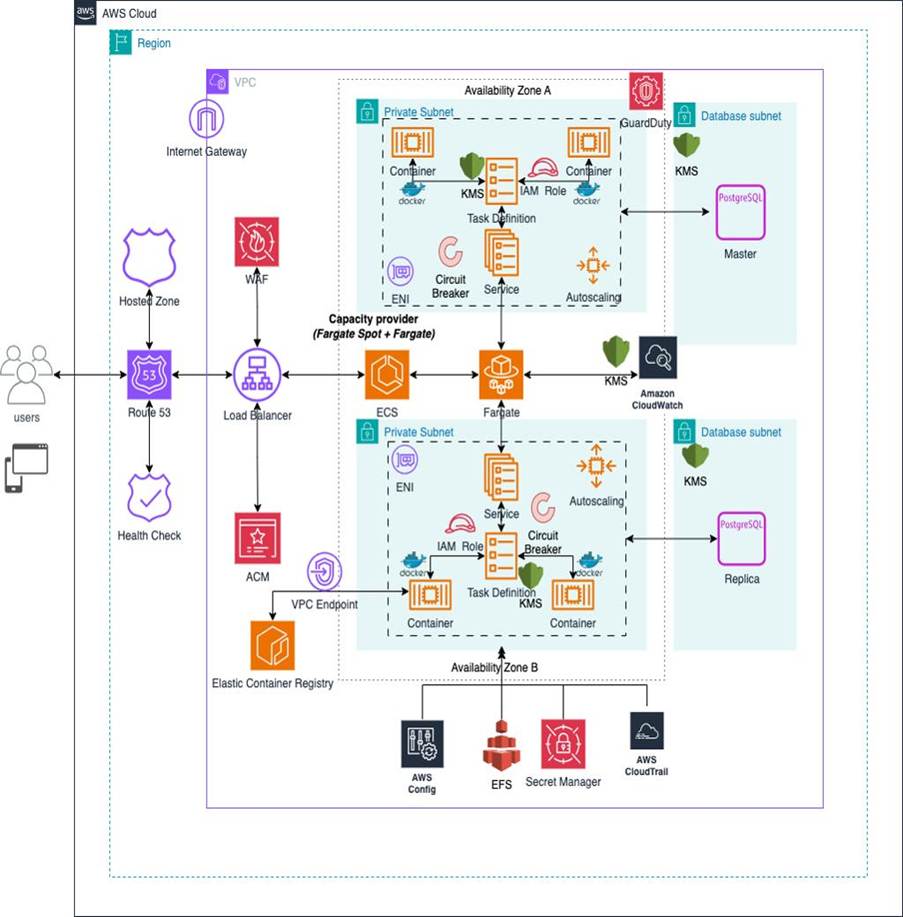
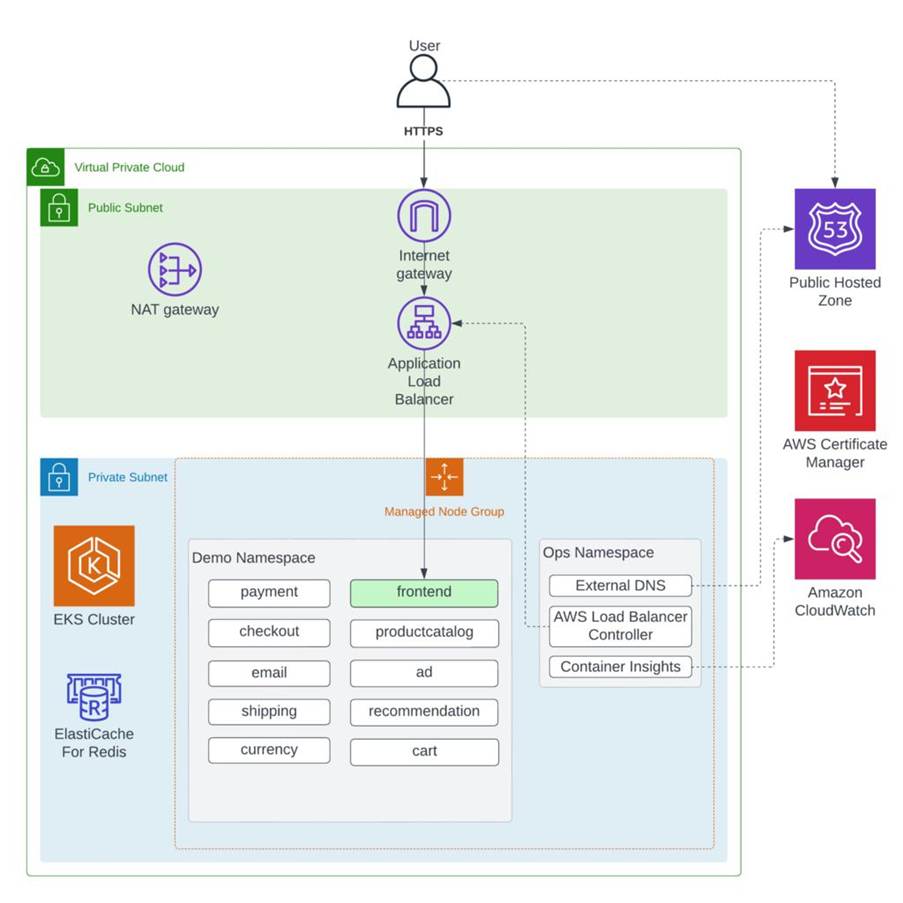
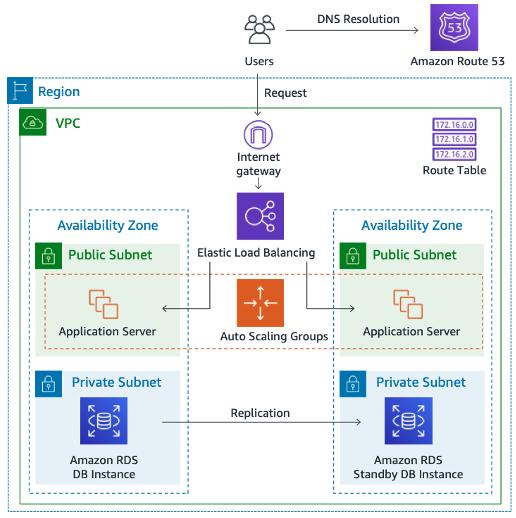
High-Level Flow
User → CloudFront → ALB → Microservices → DB / Cache / Kafka
CORE AWS COMPONENTS (DETAILED)
Networking Layer (VPC Design)
|
Component |
Purpose |
|
Amazon VPC |
Isolated network |
|
Public Subnet |
Load balancer |
|
Private Subnet |
App services |
|
Internet Gateway |
Public internet access |
|
NAT Gateway |
Outbound internet for private services |
👉 Architect Tip:
- Never expose DB to public internet
🌍 Entry Layer (User Access)
|
Component |
Purpose |
|
Amazon CloudFront |
CDN + caching |
|
AWS WAF |
Security (block attacks) |
|
Application Load Balancer |
Route traffic |
⚙️ Compute Layer (Microservices)
|
Option |
Use Case |
|
Amazon EC2 |
VM-based apps |
|
Amazon EKS |
Kubernetes |
|
Amazon ECS |
Lightweight containers |
👉 Architect Decision:
- Use EKS for large-scale systems
- Use ECS for simpler setups
🗄️ Data Layer
|
Service |
Purpose |
|
Amazon RDS |
SQL DB |
|
Amazon DynamoDB |
High-scale NoSQL |
|
Amazon ElastiCache |
Caching |
|
Amazon S3 |
File storage |
🔄 Messaging & Streaming
|
Service |
Purpose |
|
Amazon MSK |
Kafka |
|
Amazon SQS |
Queue |
|
Amazon SNS |
Pub/Sub |
🔐 Security Layer
|
Service |
Purpose |
|
AWS IAM |
Access control |
|
AWS Secrets Manager |
Store credentials |
|
AWS Shield |
DDoS protection |
📊 Monitoring & Logging
|
Service |
Purpose |
|
Amazon CloudWatch |
Logs & metrics |
|
AWS X-Ray |
Request tracing |
🔄 3. REAL DEPLOYMENT FLOW (CI/CD)
📊 Pipeline
|
Step |
Tool |
|
Code Commit |
GitHub |
|
Build |
Maven |
|
CI |
Jenkins |
|
Image |
Docker |
|
Registry |
ECR |
|
Deploy |
EKS |
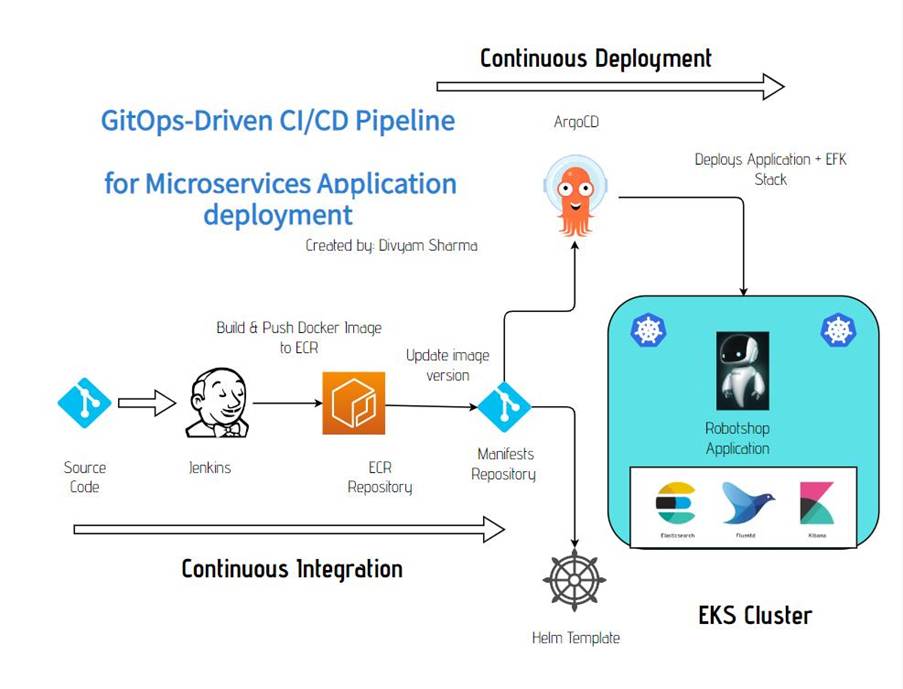
🔁 Flow
- Developer pushes code
- Jenkins builds JAR
- Docker image created
- Push to ECR
- Deploy to EKS
- Rolling update happens
📈 4. SCALING STRATEGY
|
Layer |
Scaling Method |
|
ALB |
Auto scaling |
|
EC2/EKS |
Horizontal scaling |
|
DB |
Read replicas |
|
Cache |
Redis clustering |
🔐 5. SECURITY BEST PRACTICES
|
Area |
Best Practice |
|
Network |
Private subnets |
|
Access |
IAM roles |
|
Data |
Encryption at rest & transit |
|
Secrets |
Secrets Manager |
|
API |
WAF |
💰 6. COST OPTIMIZATION
|
Area |
Strategy |
|
Compute |
Spot instances |
|
Storage |
S3 lifecycle |
|
DB |
Reserved instances |
|
Logs |
Retention policy |
🚨
7. REAL PRODUCTION CONSIDERATIONS
|
Problem |
Solution |
|
Service failure |
Auto-restart |
|
High latency |
CDN + cache |
|
DB overload |
Read replicas |
|
Traffic spike |
Auto scaling |
🎤 HOW TO EXPLAIN IN INTERVIEW (IMPORTANT)
👉 Use this structure:
“I will design a highly available, scalable AWS architecture using VPC, ALB, EKS, RDS, Redis, and Kafka.”
Then explain:
- VPC (public/private subnets)
- Entry (CloudFront + ALB)
- Compute (EKS microservices)
- Data (RDS + Redis)
- Messaging (Kafka)
- Security (IAM, WAF)
- Monitoring (CloudWatch)
🧠 FINAL ARCHITECT VIEW
A real AWS production system is:
- ✅ Highly available (Multi-AZ)
- ✅ Scalable (Auto scaling)
- ✅ Secure (IAM + private subnets)
- ✅ Observable (logs + tracing)
- ✅ Fault tolerant
21. KUBERNETES
YAML (PRODUCTION-READY)
21.1
Deployment (Spring Boot
Microservice)
apiVersion: apps/v1
kind: Deployment
metadata:
name: order-service
labels:
app: order-service
spec:
replicas: 3
selector:
matchLabels:
app: order-service
template:
metadata:
labels:
app: order-service
spec:
containers:
- name: order-service
image: your-docker-repo/order-service:latest
ports:
- containerPort: 8080
resources:
requests:
memory: "512Mi"
cpu: "250m"
limits:
memory: "1Gi"
cpu: "500m"
env:
- name: SPRING_PROFILES_ACTIVE
value: "prod"
livenessProbe:
httpGet:
path: /actuator/health
port: 8080
initialDelaySeconds: 30
periodSeconds: 10
readinessProbe:
httpGet:
path: /actuator/health
port: 8080
initialDelaySeconds: 15
periodSeconds: 5
21.2
Service (ClusterIP)
apiVersion:
v1
kind:
Service
metadata:
name: order-service
spec:
selector:
app: order-service
ports:
- protocol: TCP
port: 80
targetPort:
8080
type: ClusterIP
21.3
Ingress (External Access)
apiVersion:
networking.k8s.io/v1
kind:
Ingress
metadata:
name: order-service-ingress
annotations:
kubernetes.io/ingress.class:
"alb"
spec:
rules:
- host: order.yourdomain.com
http:
paths:
- path: /
pathType:
Prefix
backend:
service:
name: order-service
port:
number: 80
21.4
YAML EXPLANATION (ARCHITECT LEVEL)
|
Component |
Purpose |
|
Deployment |
Runs pods, handles scaling |
|
Service |
Internal communication |
|
Ingress |
External routing (ALB) |
|
Probes |
Health monitoring |
|
Resources |
CPU/memory control |
22. END-TO-END
DEPLOYMENT (AWS EKS)
Architecture Flow
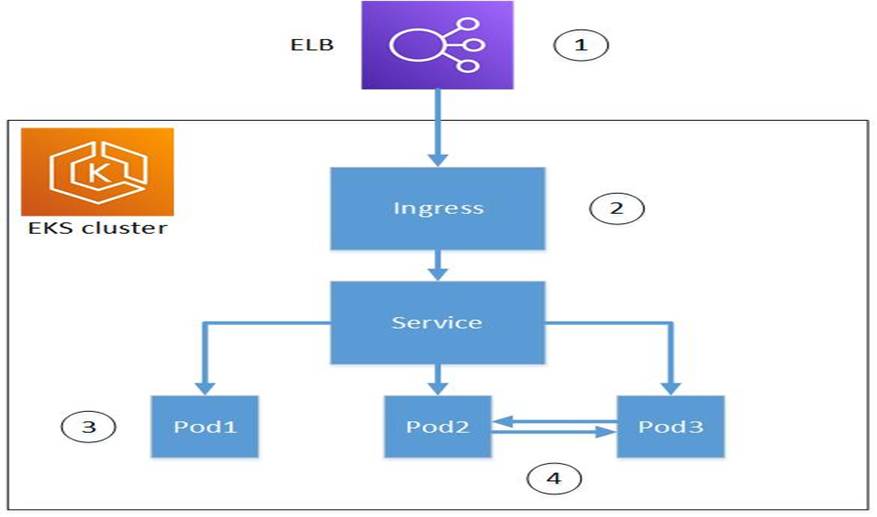
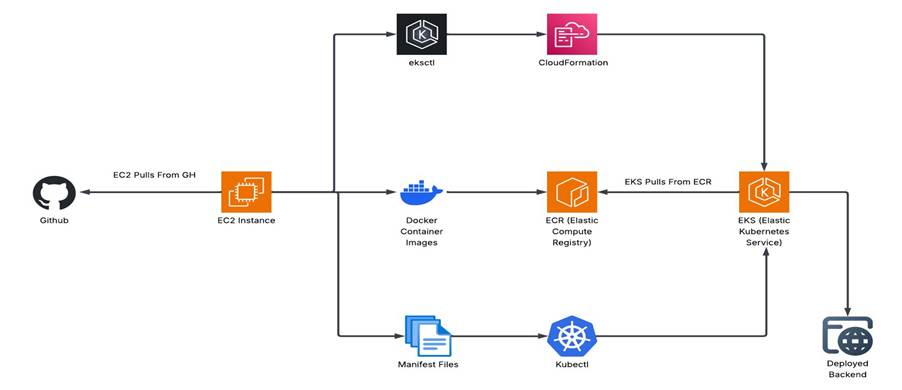
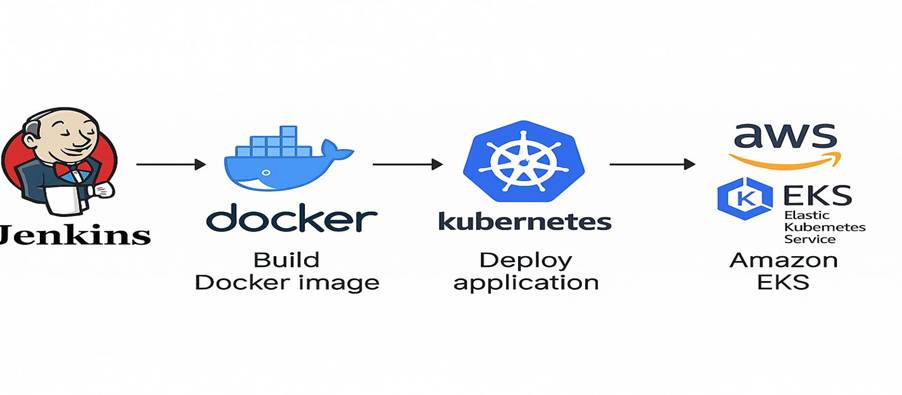
🔄 STEP-BY-STEP DEPLOYMENT
🔹 Step 1: Build Spring Boot JAR
mvn clean package
🔹 Step 2: Create Docker Image
docker build -t order-service .
🔹 Step 3: Push to Amazon ECR
aws ecr
create-repository --repository-name order-service
docker tag order-service:latest
<account-id>.dkr.ecr.region.amazonaws.com/order-service
docker push <account-id>.dkr.ecr.region.amazonaws.com/order-service
🔹 Step 4: Create EKS Cluster using Amazon EKS
eksctl create cluster --name my-cluster --region ap-south-1
🔹 Step 5: Configure kubectl
aws eks update-kubeconfig --region ap-south-1 --name my-cluster
🔹 Step 6: Deploy Application
kubectl apply -f deployment.yaml
kubectl apply -f service.yaml
kubectl apply -f ingress.yaml
🔹 Step 7: Install ALB Ingress Controller
kubectl apply -k "github.com/aws/eks-charts/stable/aws-load-balancer-controller"
🔹 Step 8: Verify Deployment
kubectl get pods
kubectl get svc
kubectl get ingress
🔹 Step 9: Access Application
Ø Use ALB DNS URL
Ø Map domain (Route53 optional)
23. AUTO-SCALING
(VERY IMPORTANT)
23.1
Horizontal Pod Autoscaler
(HPA)
apiVersion:
autoscaling/v2
kind: HorizontalPodAutoscaler
metadata:
name: order-service-hpa
spec:
scaleTargetRef:
apiVersion:
apps/v1
kind: Deployment
name: order-service
minReplicas: 3
maxReplicas: 10
metrics:
- type: Resource
resource:
name: cpu
target:
type: Utilization
averageUtilization:
70
24. PRODUCTION
BEST PRACTICES
24.1
Security
|
Area |
Practice |
|
Secrets |
Use Kubernetes Secrets / AWS Secrets Manager/Vault |
|
Network |
Private subnets |
|
IAM |
Least privilege |
24.2
🔹 Reliability
|
Feature |
Implementation |
|
Health Checks |
Liveness/Readiness |
|
Rolling Updates |
Zero downtime |
|
Retry |
Resilience4j |
24.3
🔹
Observability
|
Tool |
Purpose |
|
Amazon CloudWatch |
Logs |
|
Prometheus |
Metrics |
|
Grafana |
Dashboard |
“I containerize the Spring Boot application using Docker, push it to ECR, deploy it on EKS using Kubernetes Deployment, expose it via Service, and route external traffic using ALB Ingress. I also configure HPA for auto-scaling and use CloudWatch for monitoring.
What happens if a pod
crashes?
Ø Kubernetes restarts pod automatically
Ø Load balancer routes traffic to healthy pods
Ø Liveness
probe detects failure
24.4
HELM
CHART
Structure
helm/order-service/
├── Chart.yaml
├── values.yaml
└──
templates/
├── deployment.yaml
├── service.yaml
└──
ingress.yaml
24.4.1 Chart.yaml
apiVersion: v2
name: order-service
version: 1.0.0
24.4.2 values.yaml
replicaCount: 3
image:
repository: your-ecr-repo/order-service
tag: latest
service:
type: ClusterIP
port: 80
24.4.3 deployment.yaml
apiVersion: apps/v1
kind: Deployment
metadata:
name: {{ .Release.Name
}}
spec:
replicas: {{ .Values.replicaCount
}}
selector:
matchLabels:
app: order-service
template:
metadata:
labels:
app: order-service
spec:
containers:
- name: order-service
image: "{{ .Values.image.repository }}:{{ .Values.image.tag
}}"
ports:
- containerPort:
8080
24.4.4 Install Helm
helm install order-service ./order-service
24.4.5 Why Helm?
|
Benefit |
Explanation |
|
Reusability |
Same config across envs |
|
Versioning |
Rollbacks |
|
Templates |
Dynamic values |
25. MULTI-REGION AWS ARCHITECTURE
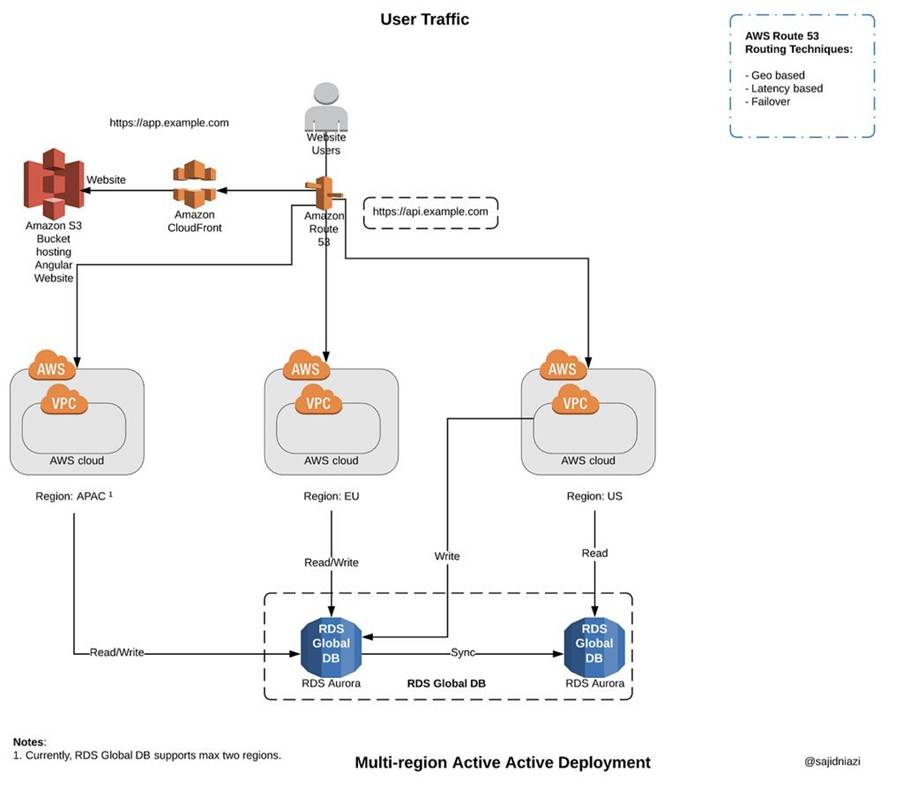
25.1
📊
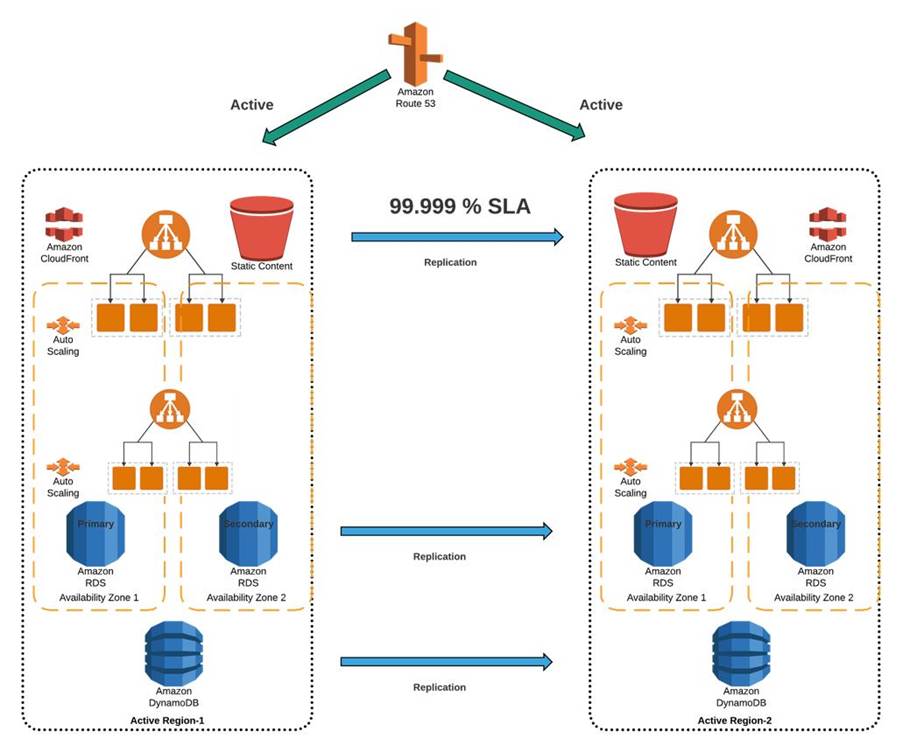
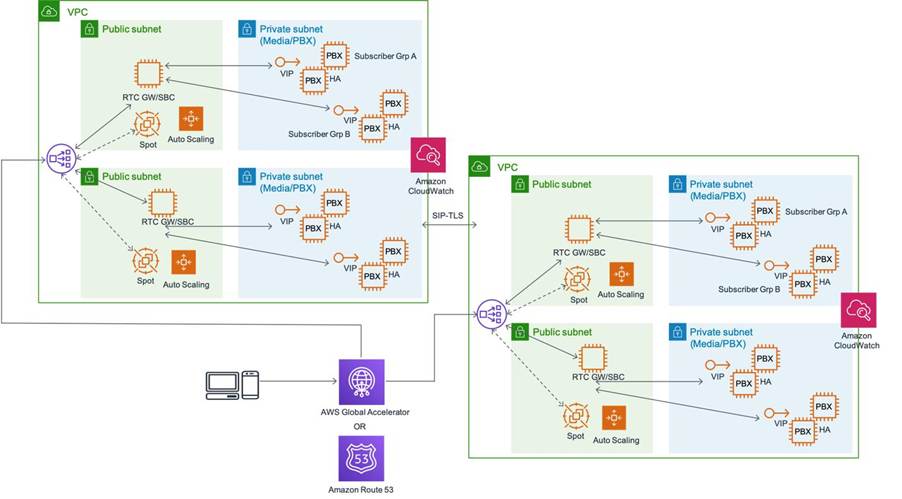
Architecture Overview
25.2
🔹
Design Types
|
Type |
Description |
|
Active-Passive |
Backup region |
|
Active-Active |
Both regions serve traffic |
25.3
🔹
Components
|
Component |
Role |
|
Amazon Route 53 |
Traffic routing |
|
Amazon S3 |
Cross-region replication |
|
Amazon RDS |
Multi-AZ + read replica |
|
Amazon DynamoDB |
Global tables |
25.4
🔹
Failover Flow
- Region
A fails
- Route53
detects failure
- Traffic
redirected to Region B
25.5
🧠
Architect Decision
- Use
Active-Active for high-scale apps
- Use Active-Passive for cost optimization
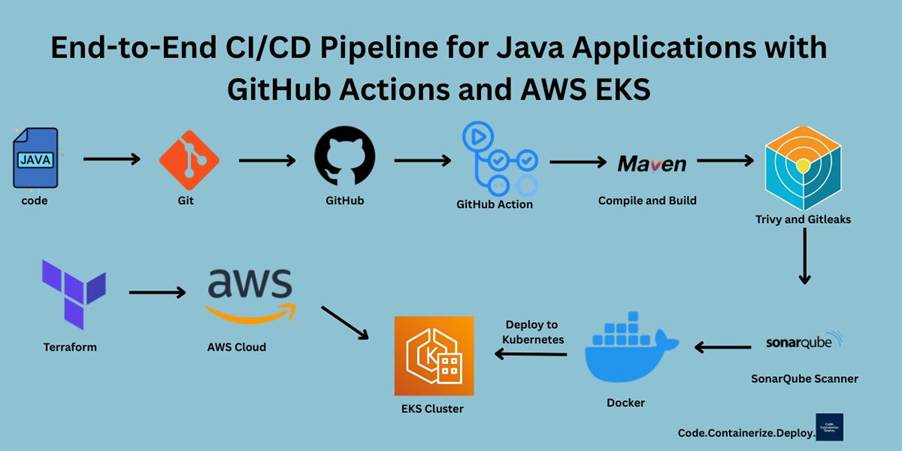
26. CI/CD
PIPELINE (JENKINS + GITHUB ACTIONS)
26.1
📊
Pipeline Flow
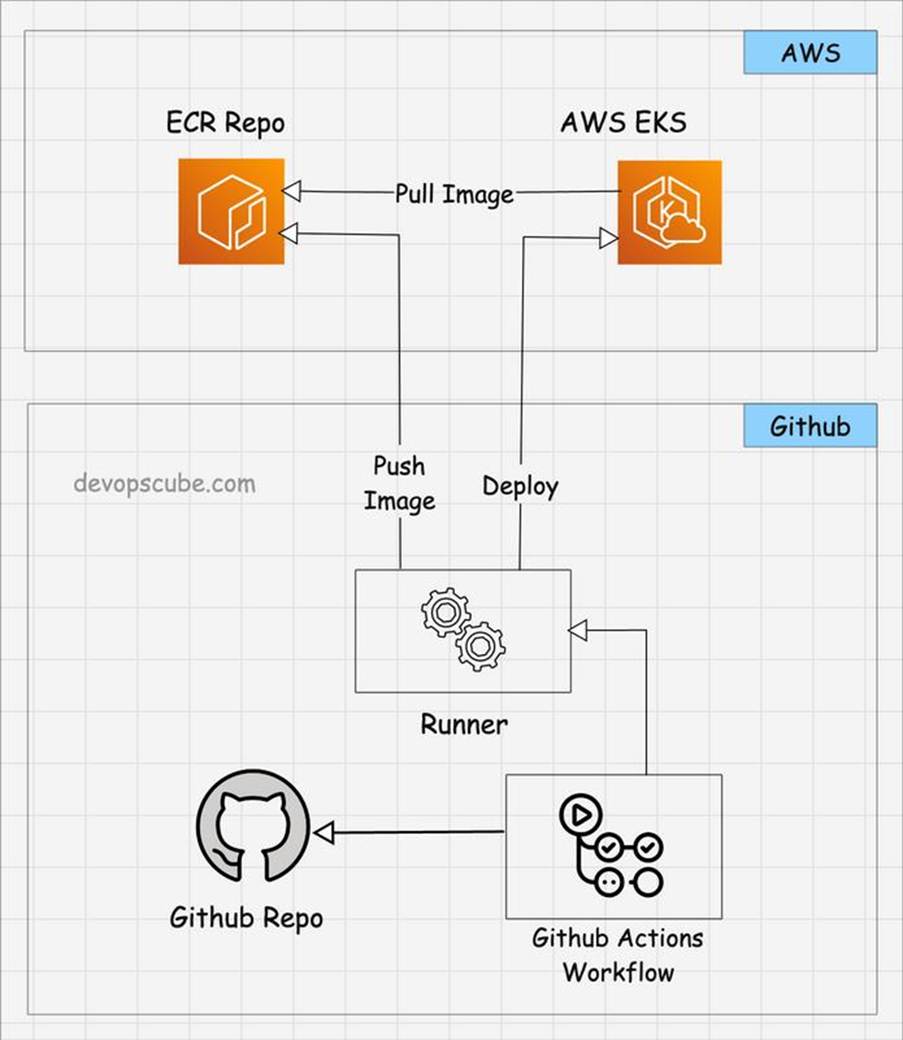
🔹
Option 1: Jenkins Pipeline
pipeline {

  agent any


  stages {

    stage('Build') {

      steps {

        sh 'mvn clean package'

      }

    }


    stage('Docker Build') {

      steps {

        sh 'docker build -t order-service .'

      }

    }


    stage('Push to ECR') {

      steps {

        sh 'docker push <repo>'

      }

    }


    stage('Deploy to EKS') {

      steps {

        sh 'kubectl apply -f deployment.yaml'

      }

    }

  }

}
🔹
Option 2: GitHub Actions
name: CI/CD Pipeline


on:

  push:

    branches: [ "main" ]


jobs:

  build:

    runs-on: ubuntu-latest


    steps:

    - uses: actions/checkout@v3


    - name: Build

      run: mvn clean package


    - name: Docker Build

      run: docker build -t order-service .


    - name: Deploy

      run: kubectl apply -f deployment.yaml
27. 🔐
PRODUCTION BEST PRACTICES
|
Area |
Best Practice |
|
Secrets |
Vault / Secrets Manager |
|
Infra |
Terraform modules |
|
Deploy |
Helm charts |
|
Scaling |
HPA + Auto scaling |
|
Monitoring |
Prometheus + Grafana |
I use Terraform for infrastructure provisioning (VPC, EKS, ECR), Helm for Kubernetes deployments, Jenkins/GitHub Actions for CI/CD, and design multi-region AWS architecture using Route53 failover with RDS and DynamoDB replication
🚀 FINAL RESULT
✅ Terraform (infra automation)
✅
Helm (deployment management)
✅
Multi-region architecture (HA + DR)
✅
CI/CD pipeline (end-to-end automation)
28. REAL-TIME ARCHITECT MOCK INTERVIEW
Round 1: Introduction
Interviewer:
“Explain your current role and architecture experience.”
✅ Ideal Answer Structure:
- Years
of experience
- Technologies
(Java, Spring Boot, Microservices)
- Systems
handled (scale, users)
- Key
achievements
🔹 Round 2: Deep Technical
Q1: How do you design a scalable microservices system?
✅ Expected Answer:
- API
Gateway
- Stateless
services
- Database
per service
- Caching
(Redis)
- Messaging
(Kafka)
- Load
balancing
Q2: How do you handle
failures?
✅ Answer:
- Circuit
breaker
- Retry
mechanism
- Fallback
- Monitoring
Q3: How do you ensure data
consistency?
✅ Answer:
- Saga
pattern
- Eventual
consistency
- Idempotency
🔹
Round 3: Scenario-Based
👉 “Payment service is
failing intermittently. What will you do?”
✅ Strong Answer:
- Check
logs (root cause)
- Monitor
metrics
- Use
circuit breaker
- Retry
failed transactions
- Notify
stakeholders
🔹 Round 4: System Design
👉 “Design a payment
system like Paytm”
(We’ll solve below 👇)
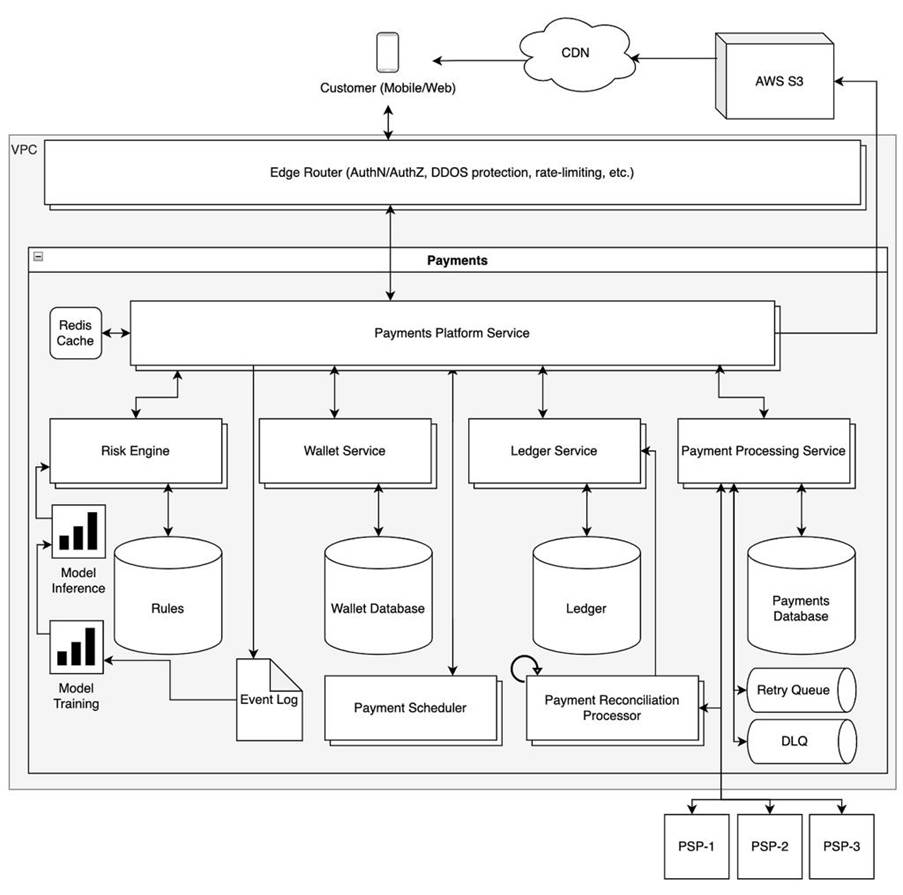
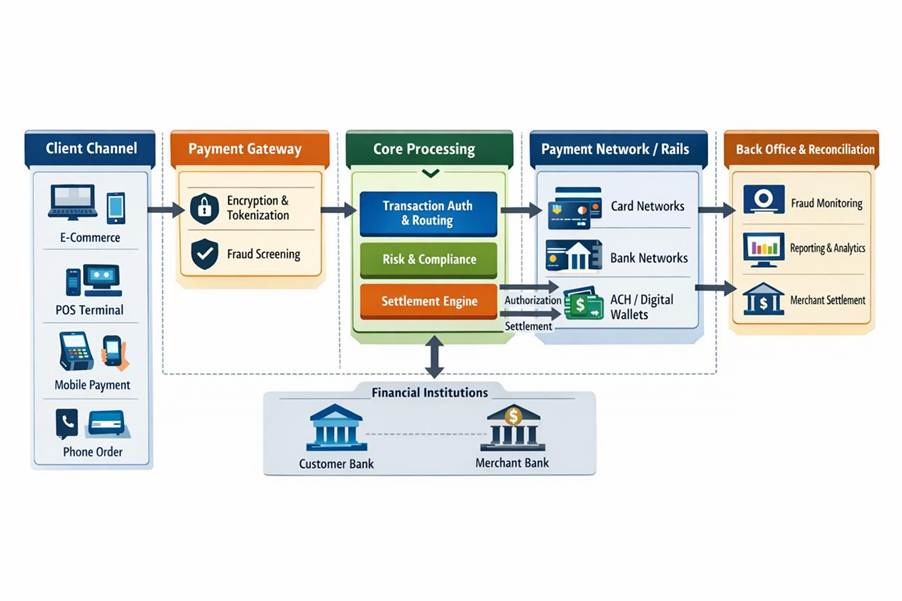
🏗️ 2. SYSTEM DESIGN (PAYTM / FLIPKART LEVEL)
🎯 Problem: Design Payment System (like Paytm)
🧠 Step 1: Requirements
Functional:
Ø Add
money
Ø Pay
merchants
Ø Wallet
balance
Ø Transaction
history
Non-Functional:
Ø High
availability
Ø Strong
security
Ø Low
latency
🏗️ Step 2: High-Level Architecture
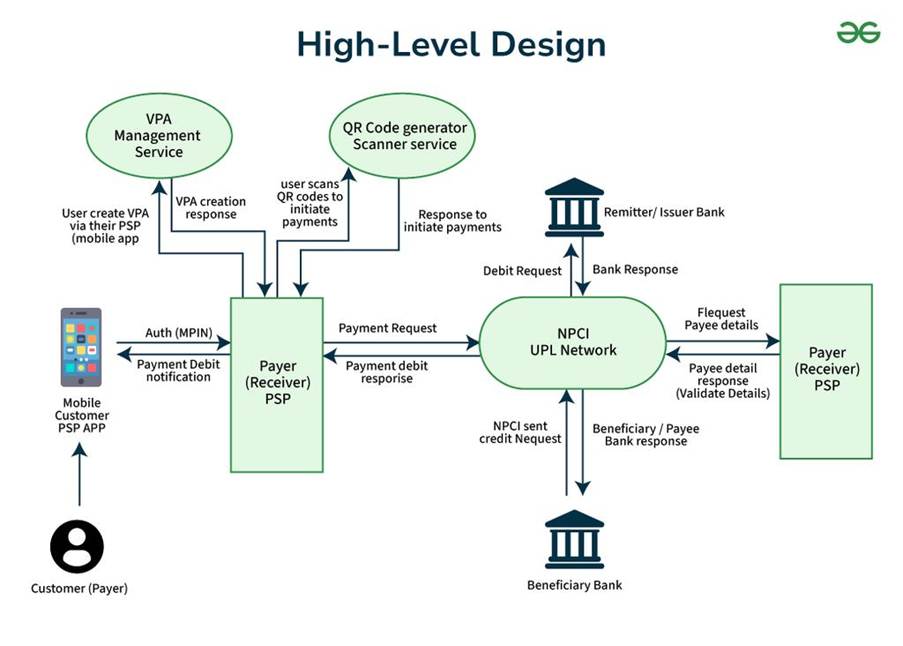
🔹
Components
|
Component |
Responsibility |
|
API Gateway |
Entry point |
|
Auth Service |
User authentication |
|
Wallet Service |
Balance management |
|
Payment Service |
Transactions |
|
Bank Integration |
External APIs |
|
Notification |
SMS/Email |
|
Kafka |
Event streaming |
🔹 Flow
- User
initiates payment
- Validate
balance
- Debit
wallet
- Send
to bank
- Update
transaction
- Notify
user
🔐 Security Design
|
Area |
Implementation |
|
Auth |
OAuth2 + JWT |
|
Encryption |
TLS |
|
Fraud detection |
ML rules |
⚙️ Scaling Strategy
|
Problem |
Solution |
|
High traffic |
Auto scaling |
|
DB load |
Sharding |
|
Latency |
Redis cache |
🔄 Data Consistency
- Use
Saga pattern
- Ensure
idempotency
- Use
event-driven architecture
🎯 Problem 2: Flipkart-like E-commerce System
🧠 Key Services
|
Service |
Function |
|
Product |
Catalog |
|
Search |
Elasticsearch |
|
Cart |
Session |
|
Order |
Order processing |
|
Payment |
Payment |
|
Inventory |
Stock |
🔹 Flow
- User
searches product
- Adds
to cart
- Places
order
- Payment
processed
- Inventory
updated
🚀 Key Architect Decisions
|
Area |
Choice |
|
Search |
Elasticsearch |
|
Cache |
Redis |
|
Messaging |
Kafka |
|
DB |
Polyglot |
📅 3. 30-DAY ARCHITECT PREPARATION ROADMAP
🗓️ Week 1: Core
Strength
|
Day |
Focus |
|
Day 1 |
Java core + JVM |
|
Day 2 |
Spring Boot |
|
Day 3 |
REST APIs |
|
Day 4 |
JPA + DB |
|
Day 5 |
Multithreading |
|
Day 6 |
Design patterns |
|
Day 7 |
Revision |
🗓️ Week 2: Advanced Concepts
|
Day |
Focus |
|
Day 8 |
Microservices |
|
Day 9 |
Kafka |
|
Day 10 |
Redis |
|
Day 11 |
System design basics |
|
Day 12 |
API Gateway |
|
Day 13 |
Security |
|
Day 14 |
Mock interview |
🗓️ Week 3: Cloud + DevOps
|
Day |
Focus |
|
Day 15 |
AWS basics |
|
Day 16 |
EKS |
|
Day 17 |
Docker |
|
Day 18 |
Kubernetes |
|
Day 19 |
CI/CD |
|
Day 20 |
Terraform |
|
Day 21 |
Revision |
🗓️ Week 4: Architect Level
|
Day |
Focus |
|
Day 22 |
System design (e-commerce) |
|
Day 23 |
Payment system |
|
Day 24 |
Scalability |
|
Day 25 |
Failure handling |
|
Day 26 |
Performance tuning |
|
Day 27 |
Mock interview |
|
Day 28 |
Weak areas |
|
Day 29 |
Full revision |
|
Day 30 |
Final mock interview |
🎯 FINAL INTERVIEW STRATEGY
🧠 Golden Rule
Always answer in this order:
- Requirements
- HLD
- Components
- DB
Design
- Scaling
- Security
- Trade-offs